Saturday, 11 March 2017

What data to store?

Sometimes the smallest mistakes can have serious side effects. And one I see very often is the mistake of storing data which can be calculated.

Here is an example of one I saw just this week in an accounting system. Can you spot the problem?

(I've removed some fields to just focus on the issue)

tblInvoiceHeader             tblInvoiceLines
InvoiceID InvoiceID
InvoiceName LineDesc
InvoiceAmount LineAmount
InvoiceTax LineTax
InvoiceTotal LineTotal

So here we have two tables - one for the Invoice Header, and one for the Invoice Lines.

And here is an example of some data. Let's assume it's a meal at a fast food restaurant or cafe.

  InvoiceID   InvoiceName   InvoiceAmount   InvoiceTax   InvoiceTotal
  100  Fred Smith       20.00     2.00      22.00

  InvoiceID   LineDesc   LineAmount   LineTax   LineTotal
   1   Hamburger      13.00     1.30    14.30
   2   Chips      4.00     0.40     4.40
   3   Drink      3.00          0.30     3.30

As you can see the lines all add up to give the total.

But ...

What if we need to change one value? Maybe the chips were meant to be $5 not $4?

Because of the way the data is stored, we need to alter the data in the LineAmount field ... AND the LineTax field ... AND the LineTotal field!

And that's not all ... !

We also now need to save the Invoice Header too! One change has completely thrown out all the data!

How should it be stored?

Well, depending on how often tax rates change, you could make an argument for keeping separate columns for the LineAmount and LineTax data. Especially in Australia where items such as food do not attract GST. But definitely the LineTotal should go.

And as for the InvoiceHeader table ... No need to have the totals on there either as a quick calculation can handle that.

This is how I recommend storing invoice data:

tblInvoiceHeader             tblInvoiceLines
InvoiceID InvoiceID
InvoiceName LineDesc
LineAmount
LineTax

Unfortunately for the poor financial controller who has this data integrity problem, there is nothing easy can do except make sure that if an Invoice Line Item is changed, then the Tax is changed, and the Line Total is changed, and the Header record is changed too.

The lesson from this is to never store data which can be calculated from other data in the same, or related record(s). 

Wednesday, 22 February 2017

Sargable Queries in SQL Server (with example)

Hi,

Recently I was reviewing a SQL stored procedure for a company and I noticed that the developers had made an all too common error. They created their WHERE clause with a non “sargable” condition.

(For information on the term sargable see this link - https://en.wikipedia.org/wiki/Sargable)

What this caused was a rather painful table scan because the query optimiser was unable to use the indexes on the table.

Let’s look at a pretty simple example, and one that you can run yourself.

We’ll begin with creating a table with three fields:

CREATE TABLE tblExampleA (ID INT IDENTITY (1,1) , Word1 VARCHAR(10) , Date1 DATETIME);

Next, we need to put some data in there. This SQL below will throw in about 50,000 rows:

DECLARE @D1 DATETIME = DATEADD(YEAR , -50, GETDATE());

WHILE @D1 < GETDATE()
BEGIN
INSERT INTO tblExampleA ( Word1, Date1 )
VALUES (DATENAME( WEEKDAY , @D1) , @D1);

SET @D1 = DATEADD(HOUR , 9 , @D1);

PRINT @D1;
END

SELECT * FROM tblExampleA;

To illustrate the issue, we want to show the difference between an Index Scan and an Index Seek. So let’s go ahead and put a clustered index on our table, and ask for the SSMS to give us the statistics of the queries we're about to run:

CREATE CLUSTERED INDEX ciByDate ON tblExampleA (Date1);

SET STATISTICS IO ON;

Finally, we’ll run two SQL statements:

DECLARE @ForDate DATE = '1978-04-28';

SELECT Top 100 *
FROM tblExampleA
WHERE CONVERT(varchar,Date1,112) = @ForDate;

SELECT Top 100 *
FROM tblExampleA
WHERE Date1 BETWEEN @ForDate AND DATEADD(day,1,@ForDate);

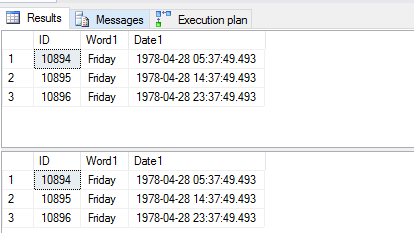
When we look at the end results, the output is the same.


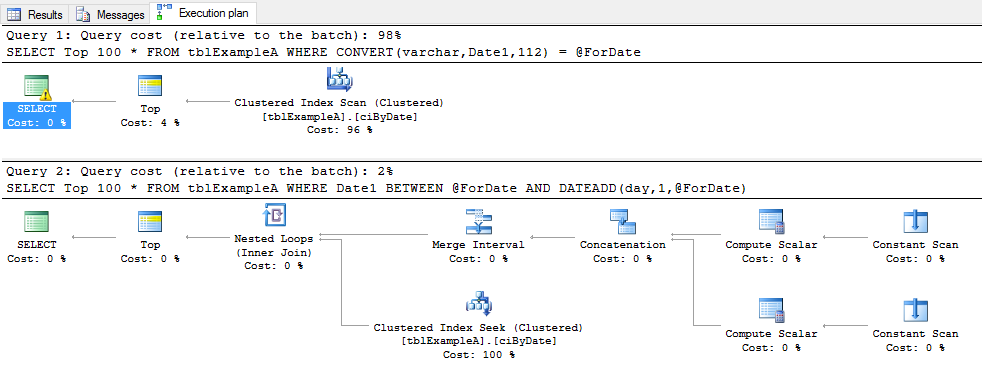
However … the work done by SQL to get the data is very different. Here are the two execution plans:


And the statistics we asked for:


Look at the difference in Logical reads.

Because of the CONVERT function over the Date1 field, the SQL optimiser was unable to use the index that we created. This is because it had to read all of the records in the table, parse them through the function and then compare them to our variable of @ForDate.
This was easily fixed, by instead of adding a function on the Date1 field to drop the Time off the DateTime field, we instead just used a different way of filtering. In this case, we used the BETWEEN condition to go from the DATE which we declared, and the Day after.

The best advice I can give when is to always test your queries, not just for the desired results, but for their optimisation. So often I see SQL code written by .Net developers, and while it returns the output they want, it is done in an most inefficient manner.

If you have any questions, I'd love to hear them so please send them through.

Rodney

Monday, 20 February 2017

Welcome

Hello,

I'm finally getting organised enough to share my tips on creating the best database possible.

This year is my 20th year in the IT industry, and after having started out as a junior AS/400 Developer, I've worked with (in order), Oracle, Microsoft Access and then while working in Rio de Janeiro of all places I finally got introduced to Microsoft SQL Server in 2005.

Since then, I've worked almost exclusively on SQL Server and have had the chance to be mentored by some great teachers, including Mr Victor Isokov.

Be sure to subscribe and check back as often as you can. I can't say how often I'll update this blog, but will aim to do it as often as I find things, or think of things which will be valuable to the everyday user of SQL Server.

Cheers,

Rodney