Showing posts with label SQL. Show all posts

Sunday, 29 September 2024

Working out why a SQL Database has grown over the limit

So I ended the previous post with

Oh, and if you're wondering, the issue was that their SQL Express had hit the 10gb limit, all because the space cadet developer had decided to save images into the database. I might do another blog post on how I figured this out as it would be helpful for beginners in the "Emergency SQL DBA" space. 


So here is how I was able to see (quickly) that it was caused by the images:


As part of my SQL Integrity Check, I poke around the tables and look at the DB size etc. I must confess that for a lot of this, I rely on scripts written by Pinal Dave.


The first thing I did though, and remember that I was talking to someone who works in construction and by his own admission doesn't know much about computers, is find out what version of SQL Server this company is using. You can easily do this by running:


SELECT @@VERSION


When I ran this I was able to see that they're running SQL Express. And of course this version of SQL has a limit of just 10Gb per database (more on that below).


I then right-clicked the database name and saw that yep, it had hit 10Gb in size and this therefore aligned with what the business owner had told me was what the error message was saying. In his words "it's saying we're out of space".


So now it's the challenge of finding out why it's hit the 10Gb limit. Has it been incrementally growing at 10mb a day for years? Or was it a sudden thing?


I moved onto this script:


https://blog.sqlauthority.com/2021/02/12/sql-server-list-tables-with-size-and-row-counts/


And almost immediately after pressing F5 on that, the issue was obvious.


The #1 ranked table was one called "Images" ... Out of the 10Gb it was taking up 9 of them!


Next I ran this:


sp_help Images


This showed me the column names and the types.


And to the surprise of absolutely nobody, there was a field called ImageData that was defined as VARBINARY(MAX). There was also a field called ImageCreateDate.


Therefore I ran this:


SELECT TOP 10 * FROM Images ORDER BY ImageCreateDate


At the time of writing it is September 2024. There were images going back to 2011 ... Thousands of them.


The business owner assured me that they had tried deleting the data from the front end. So I then explained how soft deletes work etc ...


He told me that he only needed the past 2 years of data and as he needed the system up ASAP he told me to blow the old ones away.


Now, since I am a Nervous Nelly from having working in this field for over 20 years, I did a backup first. I created a new database called RecycleBin, and copied over 15 years worth of these images to that database.


And then I did the delete.


And then the system was working again.


It's worth remembering that a SQL Server Express database is limited to 10Gb, but you can have multiple databases on the same instance. So if you need to delete data, and still have a relatively easy "undo feature", then this is a way to do it.


I hope you found this useful.


Rodney


Case Study of How I do what I do

Ever heard the phrase "we get satisfaction from our work time, not from our leisure time"? 


Last week was like that.


I was at the beach with my dog Felix at 9:15am on Monday morning when I received a phone call. It was from a small business owner who had found me on google.


"Are you the SQL guy?" he asked ... 


Long story short, it turns out this man owned a business in the construction industry and his system kept crashing. As a builder, he didn't know much about it, except that it runs on SQL Server. 


After this brief discussion, we scheduled a time for later that afternoon for me to remotely view the situation with one of his team who is more "IT literate". And during this call I see that that yes, the SQL database and its front end are having issues and I think I can help. 


The boss then asked me "what is your hourly rate to fix?". 


I replied by saying that I don't do hourly rates. Because that would be dumb.


The quicker I get it fixed (which is what he wanted) then the less I get paid. And the longer I take to fix it, the more I get paid, but the more he will get pissed off. It's a pretty stupid thing to do. 


So I quoted him $99 to do my SQL Integrity Check. I said that after I do this, then I would have more information about the problem and be able to offer an accurate quote to fix. 


I did this check on Wednesday afternoon and found what I suspected was the problem. I then quoted a price to fix, based on this assumption, and said that my work carries a money back guarantee so if I am wrong he doesn't pay. The risk is all mine.


So I implement my solution, and yep, the problem was fixed by Wednesday evening. 


Customer was happy in that his system was operational again, and I was happy as I was able to fix an issue. 


Rodney  


ps. There is something immensely satisfying about being on the beach at 9am on a Monday morning when most people are in the office. 


pps. Oh, and if you're wondering, the issue was that their SQL Express had hit the 10gb limit, all because the space cadet developer had decided to save images into the database. I might do another blog post on how I figured this out as it would be helpful for beginners in the "Emergency SQL DBA" space. 

Tuesday, 21 September 2021

What am I paying you for?

Once upon a time ... 

I had a job as a DBA. It was your typical Monday to Friday, business hours gig. 

When I started there, the system was a mess. Constantly going down, slow, no decent backup/restores happening, nor indexing, check DBs etc ... 

After a few months, I got it all under control, and even scored a payrise ... the kind where the boss calls you in and just tells you you're getting a raise because your efforts have been noticed. 

Fast forward a few months ...

The boss comes down to the IT room (on the ground floor, of course ... how stereotypical) ... 

I'm standing around doing nothing, except shooting hoops with the toy basketball hoop. 

He looks at me and says "what am I paying you for?" 

I look at the SQL CPU .. it's low. Backups worked, everything is humming. Did he want me to break something just so that I had something to do. 

That was when I really came to the realisation that DBA work was not for me. I did my job perfectly, but still had to turn up every Monday at 9am to do nothing!

Saturday, 10 July 2021

Import Excel into SQL Server


Currently a Covid Lockdown in Sydney and so I'm bored. Therefore, I decided I'd share some knowledge from all the years of ETL work I've done. 

In this video I show a simple way to get around an annoying "Microsoftism" when doing what should be a straightforward import of data from Microsoft Excel in SQL Server. 

The 'Microsoft.ACE.OLEDB.12.0' provider is not registered on the local machine. (System.Data)

If you've ever tried using the SQL Server Import and Export Wizard, and received that error, you'll know how frustrating it is ... 

Here's the solution: 


Wednesday, 22 February 2017

Sargable Queries in SQL Server (with example)

Hi,

Recently I was reviewing a SQL stored procedure for a company and I noticed that the developers had made an all too common error. They created their WHERE clause with a non “sargable” condition.

(For information on the term sargable see this link - https://en.wikipedia.org/wiki/Sargable)

What this caused was a rather painful table scan because the query optimiser was unable to use the indexes on the table.

Let’s look at a pretty simple example, and one that you can run yourself.

We’ll begin with creating a table with three fields:

CREATE TABLE tblExampleA (ID INT IDENTITY (1,1) , Word1 VARCHAR(10) , Date1 DATETIME);

Next, we need to put some data in there. This SQL below will throw in about 50,000 rows:

DECLARE @D1 DATETIME = DATEADD(YEAR , -50, GETDATE());

WHILE @D1 < GETDATE()
BEGIN
INSERT INTO tblExampleA ( Word1, Date1 )
VALUES (DATENAME( WEEKDAY , @D1) , @D1);

SET @D1 = DATEADD(HOUR , 9 , @D1);

PRINT @D1;
END

SELECT * FROM tblExampleA;

To illustrate the issue, we want to show the difference between an Index Scan and an Index Seek. So let’s go ahead and put a clustered index on our table, and ask for the SSMS to give us the statistics of the queries we're about to run:

CREATE CLUSTERED INDEX ciByDate ON tblExampleA (Date1);

SET STATISTICS IO ON;

Finally, we’ll run two SQL statements:

DECLARE @ForDate DATE = '1978-04-28';

SELECT Top 100 *
FROM tblExampleA
WHERE CONVERT(varchar,Date1,112) = @ForDate;

SELECT Top 100 *
FROM tblExampleA
WHERE Date1 BETWEEN @ForDate AND DATEADD(day,1,@ForDate);

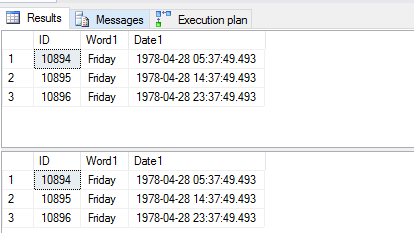
When we look at the end results, the output is the same.


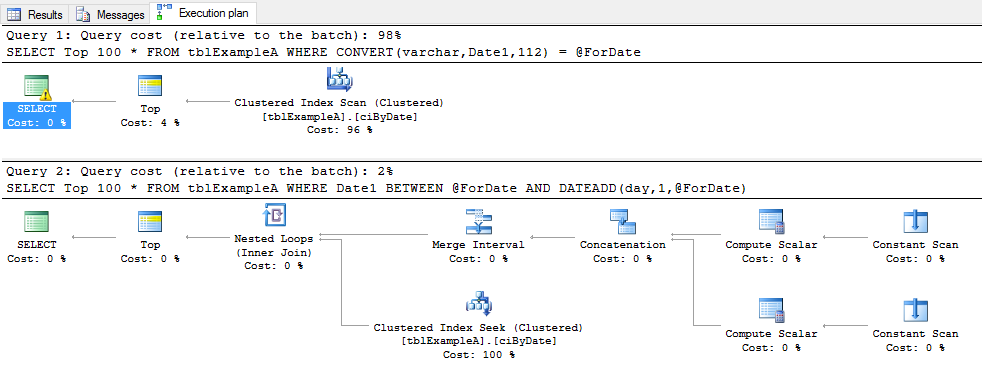
However … the work done by SQL to get the data is very different. Here are the two execution plans:


And the statistics we asked for:


Look at the difference in Logical reads.

Because of the CONVERT function over the Date1 field, the SQL optimiser was unable to use the index that we created. This is because it had to read all of the records in the table, parse them through the function and then compare them to our variable of @ForDate.
This was easily fixed, by instead of adding a function on the Date1 field to drop the Time off the DateTime field, we instead just used a different way of filtering. In this case, we used the BETWEEN condition to go from the DATE which we declared, and the Day after.

The best advice I can give when is to always test your queries, not just for the desired results, but for their optimisation. So often I see SQL code written by .Net developers, and while it returns the output they want, it is done in an most inefficient manner.

If you have any questions, I'd love to hear them so please send them through.

Rodney